StarTech.com AX54005A-USB-WIFI-6E Bruksanvisning
StarTech.com
Nettverkskort/adapter
AX54005A-USB-WIFI-6E
Les nedenfor 📖 manual på norsk for StarTech.com AX54005A-USB-WIFI-6E (4 sider) i kategorien Nettverkskort/adapter. Denne guiden var nyttig for 28 personer og ble vurdert med 4.7 stjerner i gjennomsnitt av 14.5 brukere
Side 1/4
Quick-Start Guide
To view manuals, FAQs, videos, drivers, downloads, technical drawings, and more, visit www.startech.com/support
Manual Revision: April 15, 2024
Product ID
AX54005A-USB-WIFI-6E
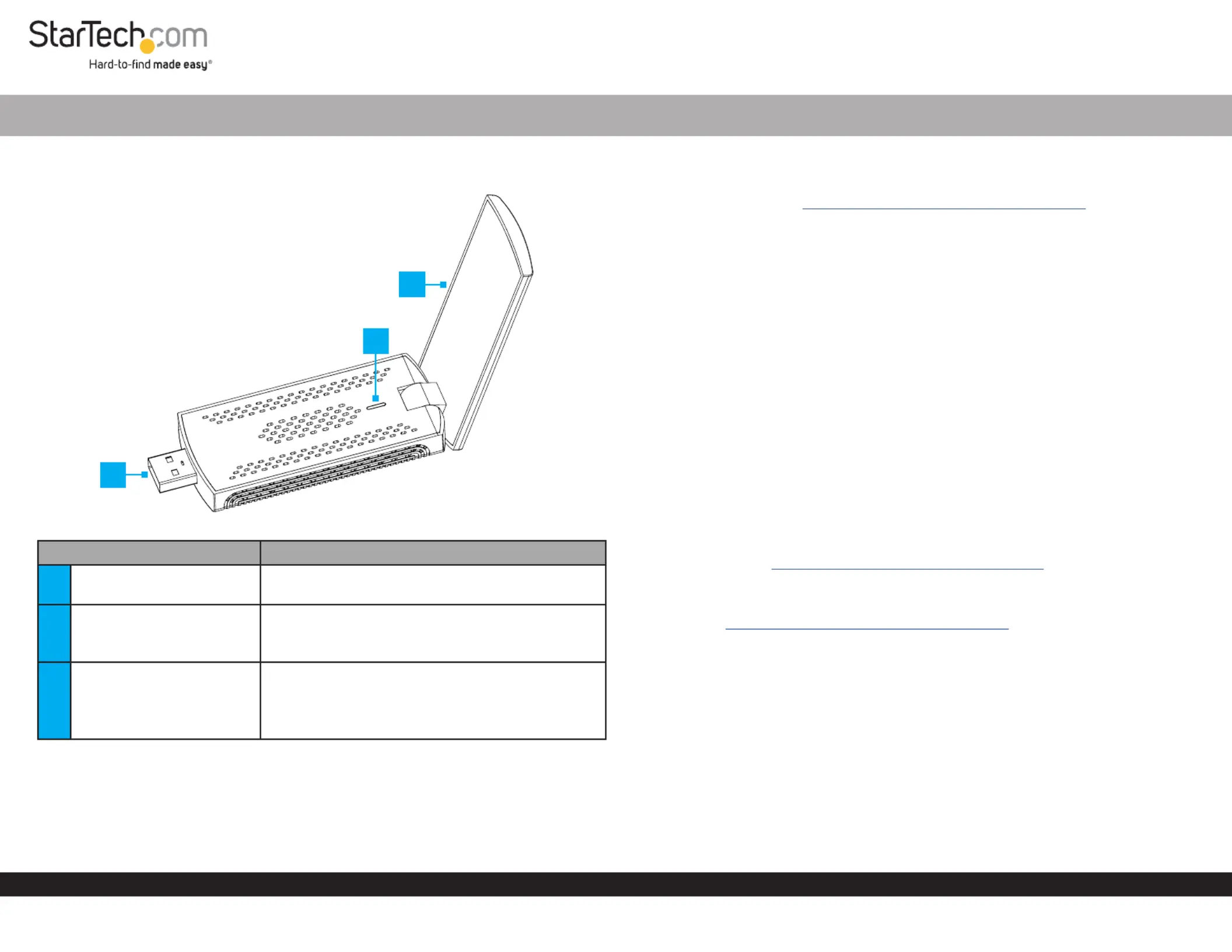
Component Function
1Antenna
• Establishes a wireless connection to a Wi-Fi
Network
2LED Indicator
• Indicates driver is installed and USB Solid Green:
connection is enumerated
• Indicates network activityFlashes Green:
3USB-A Host Connection
• Connect to an available on the USB-A Port Host
Computer Magnetic Stand, or on the included
Note: A USB 3.2 (5Gbps) Port is required for
optimal performance.
USB Wi-Fi 6/6E Network Adapter - 802.11ax
Requirements
For the latest drivers/software, technical specications, and declarations of
conformance, please visit: www.StarTech.com/AX54005A-USB-WIFI-6E
• Host Computer with an available USB-A port
Package Contents
• USB Wi-Fi Adapter x 1
• Magnetic Stand with Attached USB Extension Cable x 1
• Quick-Start Guide x 1
Installation
Install the USB Wi-Fi Adapter
Note: A USB 3.2 (5Gbps) port is required for optimal performance.
1. (Optional) Connect the with to an Magnetic Stand Attached USB Extension Cable
available and position the in the desired location.USB-A Port Magnetic Stand
2. Using both hands, gently unfold the r until the is in an USB Wi-Fi Adapte Antenna
upright position.
3. Install the into an available on either the USB Wi-Fi Adapter USB-A Port Computer
or on the Magnetic Stand.
Download the Driver
Note: Please visit to view the latest www.StarTech.com/AX54005A-USB-WIFI-6E
support documentation and operating system support.
Windows 10 does not support Wi-Fi 6E.
1. Navigate to www.StarTech.com/AX54005A-USB-WIFI-6E
2. Click the tab.Drivers & Downloads
3. Under , download the for the appropriate Driver(s) Driver Package Operating
System.
4. Extract the from the downloaded . Files Driver Package
5. Follow the included from the extracted .Driver Installation Guide Driver Package
Connect to a Wireless Network
1. To connect to a wireless network, use the built-in Operating System’s Network
Settings.
3
2
1
*Product may vary from image
Produkspesifikasjoner
| Merke: | StarTech.com |
| Kategori: | Nettverkskort/adapter |
| Modell: | AX54005A-USB-WIFI-6E |
Trenger du hjelp?
Hvis du trenger hjelp med StarTech.com AX54005A-USB-WIFI-6E still et spørsmål nedenfor, og andre brukere vil svare deg
Nettverkskort/adapter StarTech.com Manualer

15 Januar 2025

15 Januar 2025

30 Desember 2025

30 Desember 2025

29 Desember 2024

29 Desember 2024

29 Desember 2024

17 Desember 2024

23 Oktober 2024

16 Oktober 2024
Nettverkskort/adapter Manualer
- Speco Technologies
- Joy-it
- EtherWAN
- Ditek
- Edimax
- Louroe Electronics
- EQ-3
- Micro Connect
- Trendnet
- Ubiquiti Networks
- Sonnet
- Martin Logan
- Apc
- Digitus
- ZyXEL
Nyeste Nettverkskort/adapter Manualer

8 April 2025

3 April 2025

3 April 2025

2 April 2025

2 April 2025

2 April 2025

31 Mars 2025

29 Mars 2025

15 Mars 2025

15 Mars 2025